

Local SEO For Multiple Locations: How To Rank Everywhere
Running one location is hard enough. Now multiply every SEO task, Google Business Profiles, landing pages, reviews, citations, across five, ten, or fifty locations. That’s where local SEO for multiple locations gets complicated fast, and where most businesses start bleeding rankings because they’re duplicating effort instead of building a system.
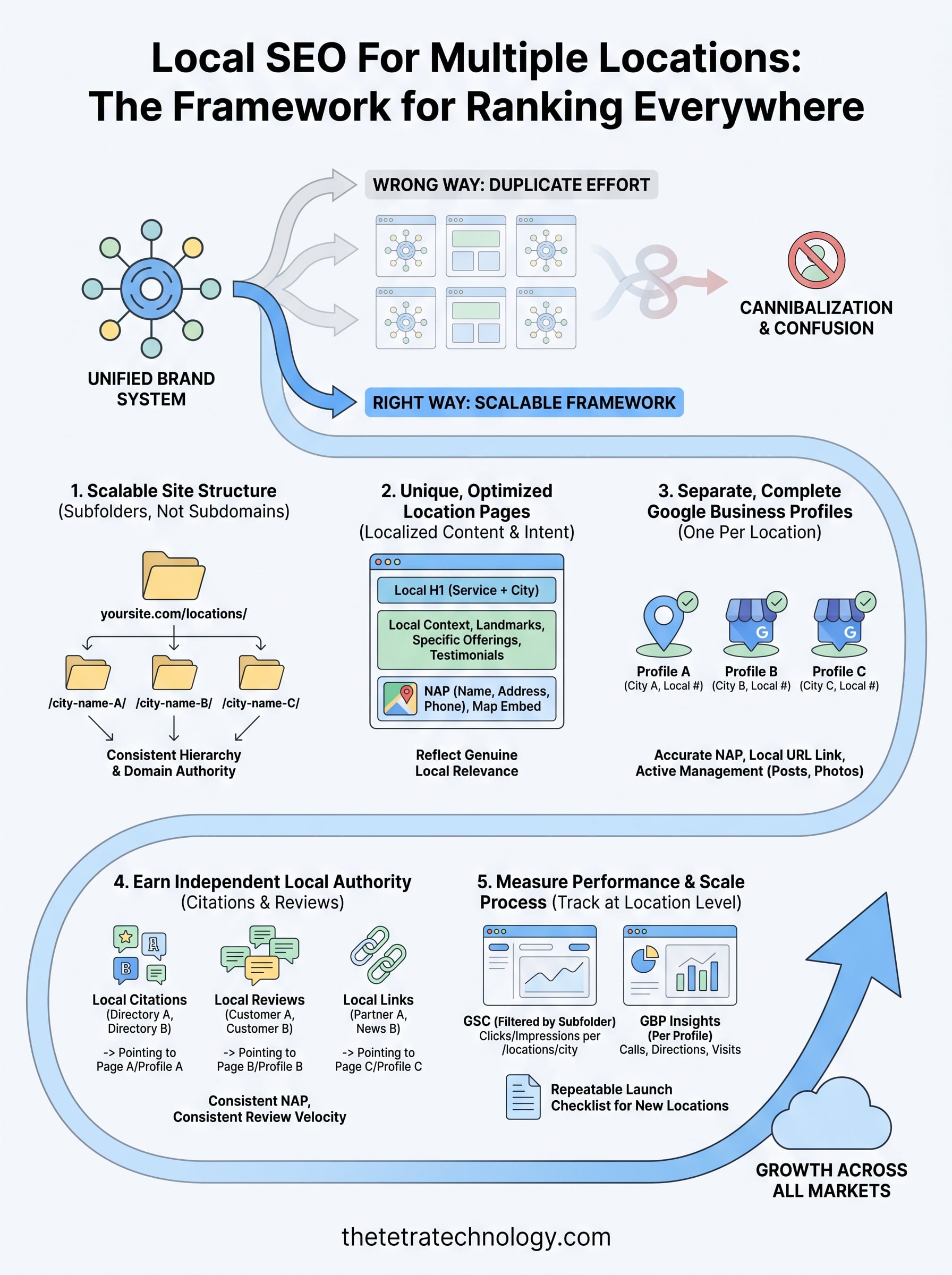
The core problem isn’t a lack of effort. It’s a lack of structure. Each location needs its own optimized presence, its own local signals, and its own content, without creating a tangled mess that confuses Google or your customers. Get this wrong, and you end up with locations cannibalizing each other in search results. Get it right, and every storefront, office, or service area becomes a ranking asset.
At Tetra Technology, we’ve spent over 12 years building SEO strategies for businesses scaling across markets, and multi-location optimization is one of the most requested services we deliver. This guide breaks down exactly how to structure your site, manage your Google Business Profiles, and create location-specific content that ranks. No theory, just the repeatable process we use with our own clients.
What local SEO looks like with multiple locations
Single-location SEO is relatively straightforward: one Google Business Profile, one set of local citations, one location page. Multi-location SEO multiplies every one of those elements, and the complexity grows fast. Each location needs its own distinct local signals to rank in that specific market, and Google treats each one as a separate entity in local search results.
The signals Google evaluates per location
Google ranks local results based on three core factors: relevance, distance, and prominence. For a business with multiple locations, you need to build all three independently for every single location. A downtown Chicago office does not borrow ranking power from your Miami branch. Each location must earn its own prominence through reviews, citations, backlinks, and on-page signals tied to that specific geography.
The biggest mistake multi-location businesses make is treating their SEO as one unified effort rather than a set of parallel, location-specific campaigns.
Local SEO for multiple locations requires you to think in terms of individual local ecosystems. Your Chicago location needs local citations in Chicago-area directories, reviews from Chicago customers, and a landing page that speaks directly to Chicago-specific search intent. The same principle applies to every market you operate in.
Where multi-location SEO commonly breaks down
Most businesses run into the same set of problems when they scale past a handful of locations. They build identical location pages with only the city name swapped out, which Google identifies as thin duplicate content. They create a single Google Business Profile and list multiple addresses, which dilutes local authority across every market instead of concentrating it where it belongs.
They also ignore review management at the individual location level, letting some branches fall behind while others stay competitive. The result is a situation where your own locations compete against each other in search results, or where none of them rank well because none of them carry strong enough individual signals. You need a clear, repeatable framework that separates each location’s SEO work while keeping your overall brand consistent. The steps ahead give you exactly that.
Step 1. Choose a scalable site structure
Your site structure is the foundation of everything that follows. Poor URL choices now create technical debt that gets harder to fix as you add more locations, and a disorganized structure confuses both Google and your visitors. Every location needs a dedicated, crawlable page at a consistent URL pattern that signals its geographic relevance from the start.
The URL structure you choose today will shape how Google understands your entire location footprint, so choose deliberately.
Use subfolders, not subdomains
The strongest structure for local SEO for multiple locations is a subfolder approach: yoursite.com/locations/city-name/. Subfolders keep each location page under your root domain, so they share your domain’s authority while accumulating their own local signals. Subdomains like chicago.yoursite.com split your authority and function more like separate sites, which hurts more than it helps.
yoursite.com/locations/chicago/
yoursite.com/locations/miami/
yoursite.com/locations/houston/
Build a consistent location hierarchy
Consistent URL patterns make scaling straightforward. If you operate across multiple states or regions, add a geographic layer to keep things organized:
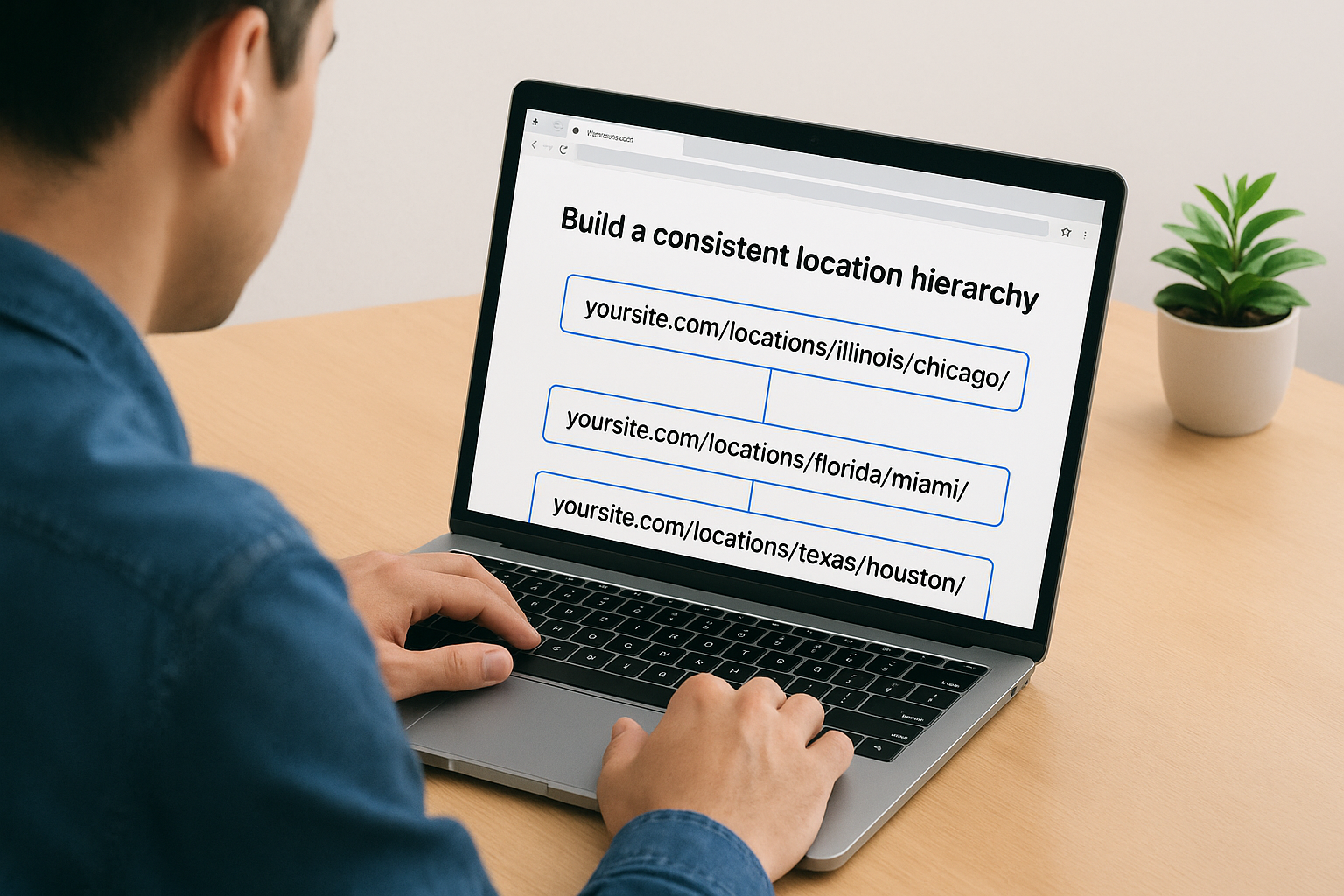
yoursite.com/locations/illinois/chicago/
yoursite.com/locations/florida/miami/
yoursite.com/locations/texas/houston/
This structure reinforces geographic relevance signals for Google, helping it connect each page to the right local market without guesswork. Stick to this pattern for every new location you add.
Step 2. Create unique location pages that convert
A location page that just swaps the city name is worthless to both Google and your visitors. Every location page you build needs to reflect genuine local relevance: local keywords, specific service details, real address information, and content that a person in that market would actually find useful.
Build pages around local intent
Each page should target a primary keyword tied to that location, such as "web development company in Chicago" or "digital marketing agency Houston." Mention local landmarks, neighborhoods, or community details that make the content feel grounded in that geography rather than generic. You should also include location-specific testimonials or case studies if you have them, because social proof from local customers builds trust faster than anything else.
Your content also needs to go beyond surface-level mentions. Write at least 400 words per location page so Google has enough substance to evaluate relevance, and make sure the NAP (name, address, phone number) appears both in the body text and in structured data on every page.
A location page that ranks is not a template with a different city name. It’s a standalone resource built for people in that specific market.
A template structure that works
Use this consistent structure across all your locations when handling local SEO for multiple locations:

| Section | What to include |
|---|---|
| H1 | Service + City (e.g., "Web Development in Chicago") |
| Intro paragraph | Local context, problem you solve in that market |
| Services section | Specific offerings relevant to that location |
| Local proof | Reviews, case studies, or client names from that area |
| Contact block | Exact address, phone number, embedded Google Map |
Repeat this structure for every location you add, and customize the content inside each section rather than copying it wholesale.
Step 3. Optimize Google Business Profiles per location
Your Google Business Profile (GBP) is the single most important local ranking asset you control outside your website. For multi-location businesses, the rule is simple: one profile per physical location, no exceptions. Combining addresses into one profile or skipping profiles for some locations is one of the fastest ways to kill your visibility in local search results.
Each Google Business Profile functions as its own local authority signal, and shortcuts here cost you rankings in every market where you cut corners.
Create a separate profile for each location
When you set up each profile in Google Business Profile Manager, fill out every available field. Inconsistent NAP data across profiles and your website is a trust signal problem that directly affects how well Google ranks each location. Use this checklist as your baseline for local seo for multiple locations:
- Business name: consistent with your website, no keyword stuffing
- Address: exact match to what appears on your location page
- Phone number: a local number specific to that location, not a single national line
- Categories: primary category first, then up to nine secondary categories
- Business hours: accurate and updated for each location separately
- Website URL: link directly to that location’s subfolder page, not your homepage
Keep every profile complete and active
Weekly activity matters on your GBP. Post updates, respond to every review, and add photos tied to that specific location. Fresh signals tell Google the profile is managed and relevant, which improves ranking consistency across all your locations over time.
Step 4. Earn local authority beyond your website
Your location pages and Google Business Profiles create the foundation, but off-site signals determine how much authority each location actually carries in local search. For local seo for multiple locations, every location needs its own stream of citations, reviews, and locally relevant backlinks pointing to it independently.
Off-site authority is not transferable between locations. You have to build it separately for each market you want to rank in.
Build consistent local citations
A citation is any online mention of your business name, address, and phone number. Submit each location individually to major data aggregators like Data Axle and Foursquare, which feed information to hundreds of directories automatically. Inconsistent NAP data across these sources creates conflicting signals that suppress your rankings, so audit each location’s citations at least twice a year and correct any discrepancies immediately.
Focus your manual submissions on high-authority directories relevant to your industry and geography before chasing volume.
Generate reviews at the location level
Reviews function as real-time local trust signals, and Google weighs them heavily in local pack rankings. Train the staff at each location to request reviews directly from customers, and link them to the specific GBP for that branch rather than a general company page. Responding to every review, positive or negative, within 48 hours signals active management and improves prominence scores over time.
Volume matters, but consistent review velocity across all locations matters more than a one-time surge at a single branch.
Step 5. Measure and scale without losing rankings
Adding more locations without tracking each one individually is how rankings quietly collapse without anyone noticing. You need location-specific performance data to understand which markets are gaining ground and which ones are slipping before a problem becomes a pattern. Measuring at the brand level only masks what’s actually happening across your individual locations.
You can’t scale what you’re not measuring, and with multiple locations, the gaps between your best and worst performers will widen over time if left unchecked.
Track performance at the location level
Set up Google Search Console with each location’s URL path so you can filter organic performance by subfolder. Pair that with Google Business Profile Insights for each location to track searches, direction requests, and calls separately. Review both on a monthly cadence and flag any location that shows a drop in impressions or clicks before it affects revenue.
Use this tracking checklist for every active location:
- Organic impressions and clicks from Search Console filtered by
/locations/city/ - GBP actions: calls, direction requests, and website visits per profile
- Review count and average rating tracked individually per location
- Citation consistency audited every six months across major directories
Build a repeatable process for new locations
Scaling local SEO for multiple locations without a documented process creates inconsistency that compounds as you grow. Build a launch checklist covering every step: subfolder creation, GBP setup, citation submissions, and on-page content requirements. When you open a new location, run through the same checklist every time so each branch starts with a complete, optimized presence from day one rather than catching up months later.
Wrap it up and keep improving
Local SEO for multiple locations is not a one-time project. You build the structure, optimize each profile, earn local authority, and then you keep refining based on what the data tells you. Each location you add is an opportunity to capture more market share, but only if you treat it as its own independent presence rather than a copy-paste of your existing work.
The businesses that rank in every market they enter do one thing consistently: they document their process, execute it completely, and measure results per location without exception. Gaps in any one of those areas let competitors close the distance.
If you want a team that has built and scaled these systems for clients across industries, Tetra Technology’s SEO and digital marketing services are built for exactly that. Reach out and let’s talk about what a multi-location strategy looks like for your business.